There are times that a lot of people forget to check their email account and suddenly they realize that they missed reading an important email. There are many reasons why things like this happen and to avoid it from happening to you, read my instructions on how to setup an email forwarder in Cpanel below:
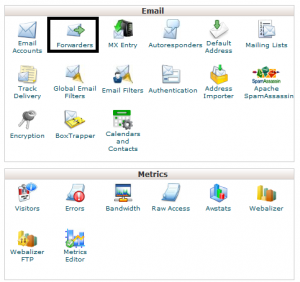
STEP 1. Click “Forwarders”
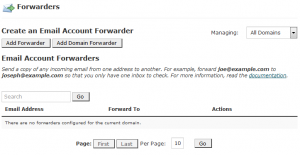
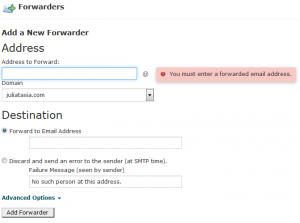
– Type address to forward
and then type “Forward to Email Address”
and then click “Add Forwarder”
Here are some blogging posts that you should also consider reading:
- How to Setup Gmail to Send and Receive Emails with your Domain Name
- How to Create an Email Account via Cpanel

Your article helped me a lot, is there any more related content? Thanks!
This is exactly what the Nigerian betting scene has been waiting for. Clean design, fast deposits through local banks, and a support team that actually replies in a timely manner. I have tried many apps but this one keeps me coming back for the straightforward experience. ngspotybet
Finding a sportsbook that actually delivers on its promises was exhausting until I landed here. The mobile app runs perfectly and I never miss a match start time. Registration was quick and my first deposit bonus arrived instantly. A solid choice for any fan. arbetssoncbaapp
Thank you for your sharing. I am worried that I lack creative ideas. It is your article that makes me full of hope. Thank you. But, I have a question, can you help me?
Thanks for sharing. I read many of your blog posts, cool, your blog is very good. https://www.binance.com/id/register?ref=UM6SMJM3
Thank you for your sharing. I am worried that I lack creative ideas. It is your article that makes me full of hope. Thank you. But, I have a question, can you help me? https://www.binance.com/register?ref=JW3W4Y3A
Can you be more specific about the content of your article? After reading it, I still have some doubts. Hope you can help me.
Your point of view caught my eye and was very interesting. Thanks. I have a question for you.
Your article helped me a lot, is there any more related content? Thanks!