There are people who find it more convenient to send email using Gmail rather than opening their webmail. No wonder why Google made it possible to choose the email you want other people to see when sending emails.
If you want to know to setup Gmail to send and receive emails with your domain name, check out the information below:
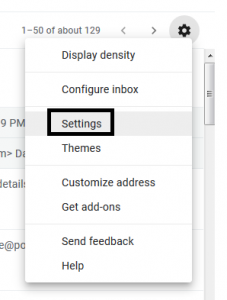
STEP 1. In the top right, click “Settings”
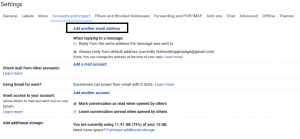
STEP 3. Click “Add another email address”
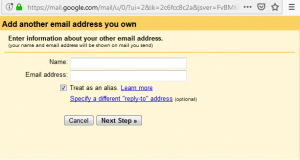
– Type Name
– Type the email account you created via Cpanel and then click Next Step
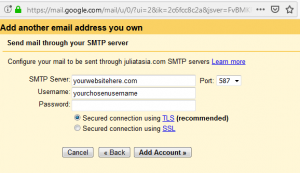
– Type your website address under “SMTP Server”
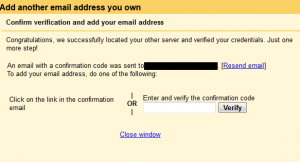
– Type the email account and password you created via Cpanel
and then click “Add Account”
Here are some blogging posts that you should also consider reading:

The support team here is incredibly helpful and always ready to guide you through any questions. I love how they keep adding fresh titles and the promotions are actually fair. It feels like a community where players really matter. Visit vnclubw88 to see for yourself
I really feel like this VIP club was built with real people in mind. The team behind the scenes clearly cares about player comfort and keeps listening to our feedback. I enjoy chatting with the live hosts and the personal touch makes every deposit feel like an investment in good times. Join 8k8viplogin now 8k8viplogin
This piece exudes a sense of calm certainty — the kind of writing that makes you feel grounded and at ease.
Your point of view caught my eye and was very interesting. Thanks. I have a question for you.