One of the common communications we have nowadays is email. Most people are using free email from Yahoo and Google. If you have a business or a website, it is important to have your own private email. Believe it or not, if you’re transacting with other businesses or blogging, it is one way to show your professionalism.
There are website owners that do not have an idea on how the website works and for some reasons; they only ask their IT guy to do simple things for them. Did you know that creating your email account via cPanel is so easy? You don’t need to be an IT professional. You just need patience and know how to follow instructions.
Today, I am going to share how to create an email account via Cpanel.
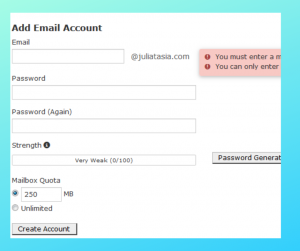
STEP 1. Click Add Email Accounts

– Type your chosen name under “Email”
– Type your chosen “Password” or click “Password Generate”
and then click “Create Account”
Here are some blogging posts that you should also consider reading:
- How to Setup Gmail to Send and Receive Emails with your Domain Name
- How to Setup an Email Forwarder in cPanel

Thank you for your sharing. I am worried that I lack creative ideas. It is your article that makes me full of hope. Thank you. But, I have a question, can you help me? https://www.binance.bh/register?ref=QCGZMHR6
Can you be more specific about the content of your article? After reading it, I still have some doubts. Hope you can help me.
I switched over from another site and the difference in speed is night and day. The sportsbook covers both mainstream matches and niche events so I never miss an opportunity to place my wagers. Withdrawals are handled promptly and the interface stays smooth even during peak hours. Really glad I found this one. vndebets